Wireframing tools are very important in modern web design and app development. Before creating a website or mobile application, designers first make a simple layout called a wireframe. This helps them plan the structure, design, and user experience. Wireframing toos make this process easy and fast. They allow designers to create visual blueprints without writing code. Whether you are a beginner or a professional, using wireframing tool can improve your workflow and save time.
In this article, we will explain
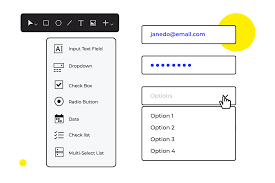
What Are Wireframing Tools?
Wireframing tool are software applications used to create basic layouts of websites or apps. These layouts show where elements like buttons, menus, images, and text will be placed. Wireframes are not final designs. They are simple sketches that help teams understand the structure before development starts.
Wireframing tool help in:
- Planning user interface
- Organizing content
- Improving user experience
- Reducing design errors
Why Wireframing Tools Are Important?
Wireframing tool play a key role in design and development. Without proper planning, projects can become confusing and costly.
Here are some reasons why wireframing tool are important:
They help teams visualize ideas clearly. Designers, developers, and clients can all understand the layout easily.
They reduce mistakes. By creating a wireframe first, you can fix problems before development begins.
They save time and money. Making changes in a wireframe is easier than changing a fully developed website.
They improve communication. Teams can discuss and approve designs quickly.
Top Features of Wireframing Tools
Wireframing tools come with many powerful features that make designing websites and apps easier and more efficient. Here are the top features in detail:
1. Drag-and-Drop Interface
The drag-and-drop interface is one of the most important features. It allows you to place buttons, images, menus, and other elements easily. You don’t need any coding skills, making it perfect for beginners and professionals alike.
2. Pre-Built Templates and Components
Most wireframing tool provide ready-made templates and UI components. You can start quickly without designing everything from scratch. Templates save time and maintain design consistency across pages.
3. Interactive Prototyping
Some wireframing tool let you create interactive prototypes. Users can click on buttons, navigate between pages, and experience a simulation of the final product. This is useful for testing and presenting designs before development.
4. Real-Time Collaboration
Modern wireframing tool support real-time collaboration. Multiple team members can work on the same project simultaneously. Designers, developers, and clients can comment, suggest changes, and approve layouts instantly.
5. Cross-Platform Support
Many wireframing tool work on multiple devices like Windows, Mac, and mobile platforms. You can design on one device and continue on another, ensuring flexibility for remote teams and designers on the go.
6. Export and Sharing Options
Wireframes can be exported in multiple formats such as PDF, PNG, or SVG. Some tools also allow you to share links directly with clients or teams. This makes presenting and reviewing designs easy.
7. Version Control and History
Some advanced tools keep track of changes made in wireframes. You can revert to previous versions or compare edits. This ensures no work is lost and improves project management.
8. Customizable UI Elements
Wireframing tool allow customization of shapes, colors, text, and icons. You can match the wireframe to your brand or project requirements, making it more professional and tailored.
9. Cloud-Based Storage
Cloud-based wireframing tool save projects online. You can access your work from anywhere, collaborate easily, and never worry about losing your files.
10. Integration with Other Tools
Many wireframing tools integrate with design and project management software like Slack, Jira, or Figma. This improves workflow and ensures smooth communication between teams.
Types of Wireframing Tools
Low-Fidelity Wireframing Tool
These tools create simple designs with basic shapes and placeholders. They focus on structure rather than design.
They are best for early planning stages.
High-Fidelity Wireframing Tools
These tools create detailed and realistic designs. They include colors, fonts, and images.
They are used for final presentations and client approval.
Online Wireframing Tools
Online wireframing tool work in browsers. You do not need to install anything.
They allow team collaboration and real-time editing.
Offline Wireframing Tools
These tools are installed on your computer. They may offer better performance and offline access.
Top Features of Wireframing Tools
Drag and Drop Interface
Most wireframing tool offer drag and drop functionality. This allows users to easily place elements on the screen.
Even beginners can create layouts without technical knowledge.
Pre-Built Templates
Wireframing tool come with ready-made templates. These templates help users start quickly.
You can customize templates according to your project needs.
Collaboration Features
Modern wireframing tools support teamwork. Multiple users can work on the same project.
This is useful for remote teams and companies.
Interactive Prototyping
Some wireframing tools allow you to create interactive prototypes. This means users can click buttons and navigate between screens.
It gives a real feel of the final product.
Export and Sharing Options
Wireframes can be exported in different formats like PDF, PNG, or shared via links.
This makes it easy to present designs to clients.
Cross-Platform Support
Many wireframing tools work on different devices such as Windows, Mac, and mobile.
This gives flexibility to users.
Best Wireframing Tools in 2026
Figma
Figma is one of the most popular wireframing tools. It is web-based and supports real-time collaboration.
It is widely used by designers and developers.
Adobe XD
Adobe XD is a powerful design tool with wireframing and prototyping features. It is suitable for professional designers.
Balsamiq
Balsamiq is known for simple and low-fidelity wireframes. It is perfect for beginners.
Sketch
Sketch is a popular tool for UI and UX design. It offers advanced features for professionals.
Axure RP
Axure RP is an advanced tool for complex wireframes and prototypes. It is used by large companies.
Benefits of Using Wireframing Tools
Wireframing tools provide many advantages.
They help in better planning and organization. Designers can structure content properly.
They improve user experience. By testing layouts early, you can create user-friendly designs.
They increase productivity. Teams can work faster with clear plans.
They reduce development costs. Fixing issues in early stages is cheaper.
How to Choose the Right Wireframing Tool
Choosing the right tool depends on your needs.
If you are a beginner, choose simple tools like Balsamiq.
If you need collaboration, go for online tools like Figma.
For professional work, Adobe XD or Axure RP are good options.
Always consider:
- Budget
- Features
- Ease of use
- Team requirements
How to Use Wireframing Tools
Using wireframing tools is simple.
First, define your project goals. Decide what you want to design.
Next, choose a template or start from scratch.
Then, add elements like buttons, images, and text.
After that, arrange elements properly.
Finally, share your wireframe with your team or client.
Common Mistakes to Avoid
Many beginners make mistakes while using wireframing tools.
They focus too much on design instead of structure.
They skip user experience planning.
So, they add too many details in the early stages.
Avoiding these mistakes will improve your results.
Future of Wireframing Tools
Wireframing tools are becoming more advanced with new technologies.
AI is being used to create automatic layouts.
Collaboration features are improving.
Cloud-based tools are becoming more popular.
In the future, wireframing tools will become even easier and more powerful.
Conclusion
Wireframing tools are essential for designing modern websites and apps. They help in planning, organizing, and improving user experience.
Whether you are a beginner or a professional, using the right wireframing tools can make your work easier and more efficient.
With many options available, you can choose the tool that best fits your needs and start creating amazing designs today.